• Home
  • MakerSpace Blogs
    • 3D Printing
    • AI News
    • Art
    • Classroom
    • Crafts
    • Ideas
    • Makerspace for Education
    • Projects
    • Resources
    • Robotics
    • STEM
    • Tools
  • MakerSpace Videos
    • Makerspace for Education
    • Makerspace Ideas
    • Makerspace Projects
    • Makerspace Resources
    • Makerspace Robotics
    • Makerspace STEM
    • Makerspace Tools
  • Our Sponsor
No Result
View All Result
No Result
View All Result
Home Classroom

How Do I Personalize My Google Classroom Homepage?

February 5, 2021
in Classroom
0
How Do I Personalize My Google Classroom Homepage?
Share on FacebookShare on Twitter

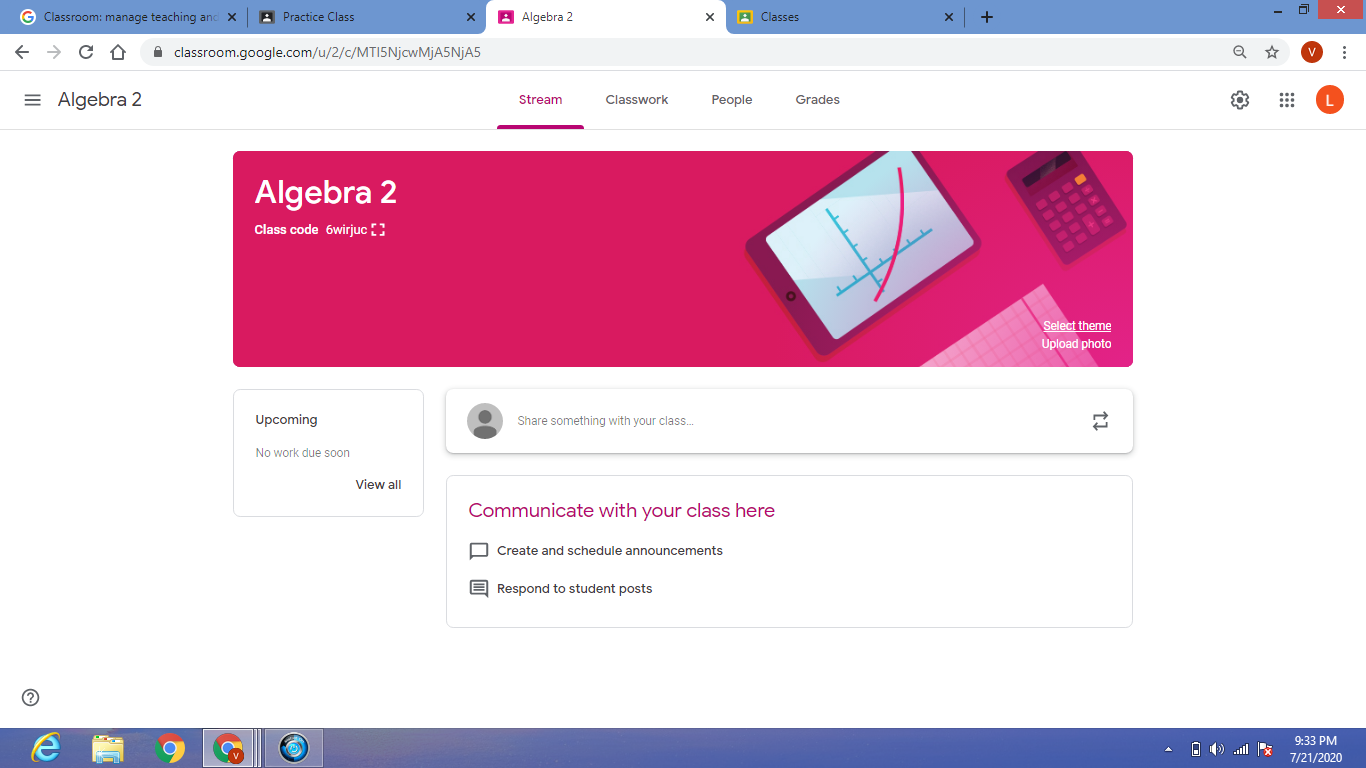
Personalize your homepage to make it stand out or reflect your personality and style.  Google Classroom will put a random image as your background, but you can change it. You can pick a theme from a menu of choices provided by Google. The themes include the following categories: General, English & History, Math & Science, Arts, Sports, or Other.  Each category has several colorful and artistic images to choose from. 

To select a theme, go to the homepage of your Classroom, and you will see a colorful rectangular box that lists the class title and class code. In the bottom left corner, it says “Select theme”. Click on it to pull up your options.

Pick out the theme that represents your Class best, and then press “ Select class theme”, located at the bottom right corner. It will automatically…

Read full Story ➤
Previous Post

Coding and Robotics club for kids opening in Bellingham, WA

Next Post

Power Moves: Former City Councilman Leon Pinkett is the new executive director of BARCO

Archive

Most commented

OT students partner with Garage Makerspace to improve quality of life – Jagwire

Girls Scouts enjoy new Modesto STEM center on Oakdale Road

Army Advances Additive Manufacturing From Experimental Tech to Enterprise Sustainment Tool

SCVNews.com | Registration Open for COC’s 2019 Summer Institute

Annie Gotwald leaves legacy with STEM space in Westfield

DIY Makerspace at Home: How to create sensory-rich, STEM fun for kids –

MarkerSpace America

MakerSpace America, Inc.
216 N Mosley Street #273
Wichita, KS 67202

Tags

Makerspace 3D Printing Makerspace Art Makerspace Classroom Makerspace Crafts Makerspace for Education Makerspace Ideas Makerspace Projects Makerspace Resources Makerspace Robotics Makerspace STEM Makerspace Tools

Recent News

OT students partner with Garage Makerspace to improve quality of life – Jagwire

OT students partner with Garage Makerspace to improve quality of life – Jagwire

May 27, 2026
Girls Scouts enjoy new Modesto STEM center on Oakdale Road

Girls Scouts enjoy new Modesto STEM center on Oakdale Road

May 26, 2026

© 2020 Copyright - 2018-2021 by MakerSpace America, Inc. A 501(c)3 Nonprofit Organization.

No Result
View All Result
  • Home
  • MakerSpace Blogs
    • 3D Printing
    • AI News
    • Art
    • Classroom
    • Crafts
    • Ideas
    • Makerspace for Education
    • Projects
    • Resources
    • Robotics
    • STEM
    • Tools
  • MakerSpace Videos
    • Makerspace for Education
    • Makerspace Ideas
    • Makerspace Projects
    • Makerspace Resources
    • Makerspace Robotics
    • Makerspace STEM
    • Makerspace Tools
  • Our Sponsor

© 2020 Copyright - 2018-2021 by MakerSpace America, Inc. A 501(c)3 Nonprofit Organization.

Welcome Back!

Login to your account below

Forgotten Password?

Retrieve your password

Please enter your username or email address to reset your password.

Log In

Add New Playlist